Wednesday, 6 September 2017

LabVIEW Architectures Series 1 of 8


Architectures in LabVIEW
We have used many architectures in our LabVIEW projects. Here we are going to discuss different kind of architectures in LabVIEW (form Simple State Machine to Actor Frame Work).
Basically National Instrument has defined 3 basic type of Architectures in LabVIEW.
·       Simple VI
A VI without structure is called simple VI.
Simple VI
·       General VI
If any Structures is used inside of the VI it is called General VI.
General VI
·       Simple State Machine
This Simple State Machine Architecture in LabVIEW is introduced by National Instruments. This is the very simplest and basic format of state machine. This will contain a While loop, Case structure and Typedef Enum connected to shit register.

Simple state Machine
Here end of every state it will decide the next state. In this scenario
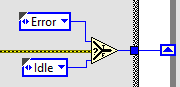
if error occurred in Init function it will go to Error state else wait for idle state.
Using this Basic Architecture Developers changed many things to do more complex applications.
Next series we will see what are the changes makes State Machine is more powerful tool.
Comment your thoughts.


Tuesday, 5 September 2017

Challenge #3

Challenge #2 Winners

We are so happy to received submissions for Challenge #2 which is 3 times the previous solution. Thanks for your submissions.


1. Jhareesh Akella


Very good explanation, Handled most of the loop holes of this applications. Excellent coding style.

2. Shrikant Singh


Used inbuilt function to search the dictionary word. Also he used Defer Panel Updates Property to avoid UI Update while searching. This property will very use full for very big applications.


Defer Panel Updates Property

When you set this property to TRUE, LabVIEW redraws any front panel objects with pending changes then defers all new requests for front panel updates. For example, controls and indicators do not redraw when you change their properties or values. If the operating system requests a redraw, such as if the window is no longer behind another window, LabVIEW redraws the front panel with the current properties instead of the original properties. If FALSE, LabVIEW immediately redraws the changed elements of the front panel.


Here is the Defer panel update VI which is made by Shrikant singh. Make use of this to your applications.


3. Basker Babu


Good approach to attain the solution.


 Congrats all three. Keep Posting your solutions and share knowledge :) Challenge #2

Challenge #3

Here is the Task oriented Coding Challenge 3


We have 3 inputs named A,B & C

Create a code in such a way that output results the formula mentioned in the Formula control


The Formula should support following functions
Addition (+)
Subtraction (-)
Multiplication (*)
Subtraction (/)
power (^)
Square root (sqrt)

This should also support parenthesis () for formulating
  

Add your name to the VI Name (for example Challenge #3_Ramesh) For easy valuation.

Thanks.


Note:
  1. Send your VI to support@thelabview.com
  2. Avoid sending multiple emails
  3. Comments and feedback are welcome
  4. Winner of this challenge posted at the start of the next challenge.